
How to Make Your Site More Conversational: Search, Chat, and Content
TL;DR
A conversational site understands a question asked in plain language and answers it, or moves the visitor to the right next step. You can start in three places (conversational search, an on-site assistant, or content written for questions), and the right first move depends on where your visitors get stuck. This quarter, pull your top site searches and support questions and check whether your site answers the top ten in one step.
In September 2026, AI traffic to U.S. retail sites grew 71% year over year, and those visits converted 90% better than non-AI traffic, according to Adobe (Oct. 29, 2026). These visitors are used to asking a full question and getting a specific answer. They ask things like "Which trail running shoes work for wide feet under $150?" or "When's the last day I can drop a course without a fee?" Then they can land on a site where search only matches keywords and the chat widget offers to take a message. Conversational search, on-site assistants, and content written for questions are how a site closes that gap.
In part 1 of this series, we covered personal AI agents that browse and shop for people. This post covers the other side, which is what your own site does when someone asks it a question. It builds on our October 21 webinar, Conversational AI: Evolving from Basic Search & Chat, and covers search, on-site assistants, and content structured for questions, plus how to pick where to start.
What a conversational website does
A conversational website understands a question written the way a person talks and responds with a specific answer or a clear next step. A chatbot is one way to get there. If you’ve been looking around many shopping sites recently, you may have encountered that little robot icon in the bottom-right corner. And that’s the guy we are referring to here. It isn't the only way, and it's often not the first thing to build.
It happens in three layers. Search is where high-intent visitors already type what they want. Chat and assistants handle follow-up questions, guidance, and handoffs to your team. Content sits underneath both. If the answer isn't on a page, written clearly and kept current, neither search nor chat can give it.
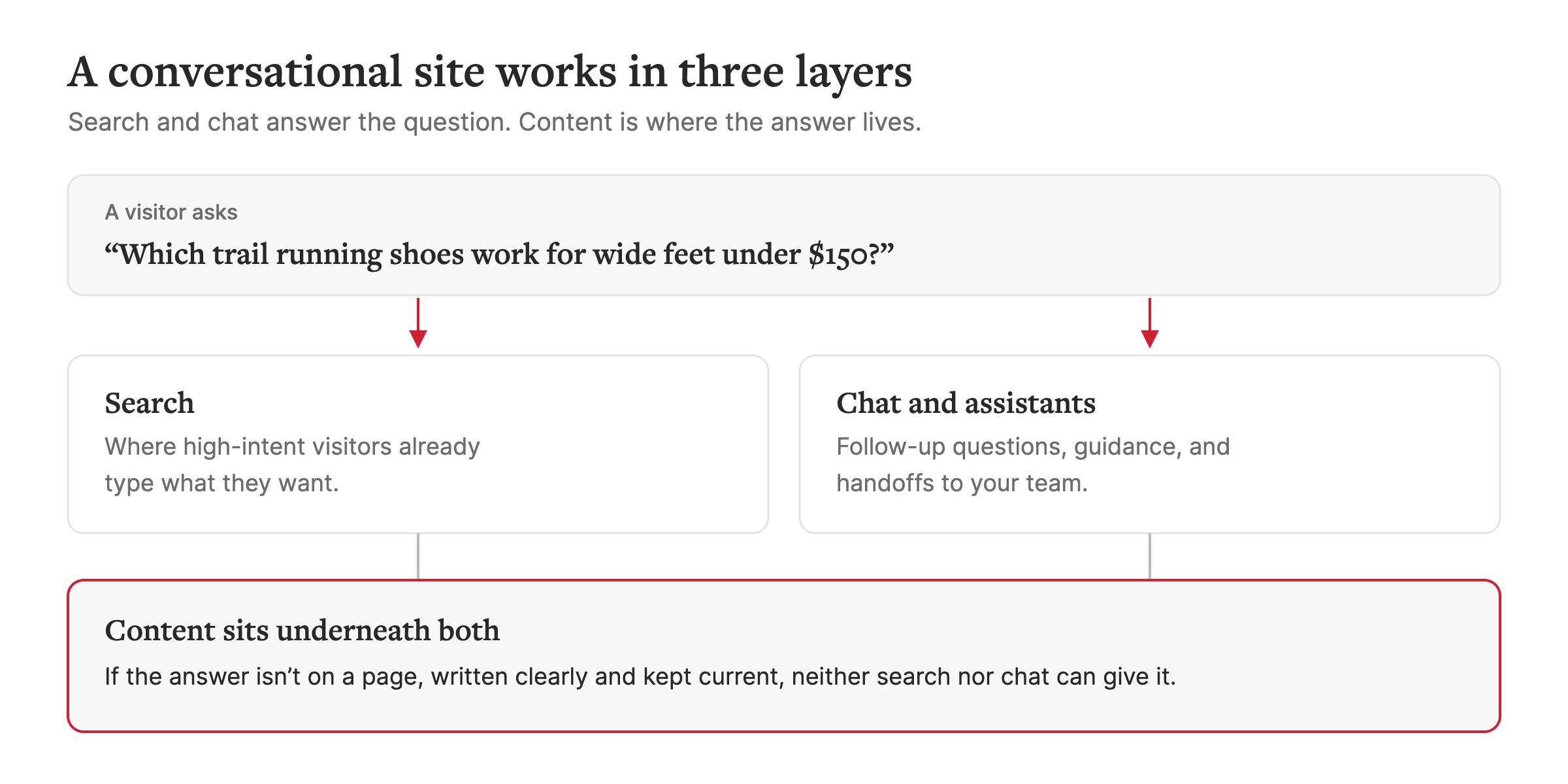
The content layer is also where on-site AI and generative engine optimization (GEO) overlap. The structured pages that feed your own search and assistant are the same pages ChatGPT, Perplexity, and Google AI Mode read when they decide whether to cite you. Part 3 of this series covers that data work in detail.
Where to start
How to add conversational search to your website
People who use site search are telling you what they want in their own words. Keyword search tends to fail them on synonyms, typos, and questions with several conditions, like "waterproof boots that last a prairie winter." Conversational search is search that works like asking a person, in full questions instead of a few keywords. On your site, it reads the intent behind those questions and can return a short answer above the results, with links back to the pages it drew from.
Before you buy anything, check what your current search can already do. In our experience, a lot of internal site search is configured at launch and never tuned again. Synonyms, ranking rules, and filters are often settings in the search platform you already license, so tuning them doesn't require a rebuild. Your search logs show where tuning stops. If the failed queries are full questions with several constraints, keyword matching has hit its ceiling, and an AI search layer is the next step.
Either way, search works best with clear page titles, consistent metadata, and product or program attributes complete enough to filter on. So be sure to check your most-searched pages and make sure the products have all their necessary attributes like size or color.
Chat and assistants on your site
Does your site need a chatbot? It earns its place when it does something your search, filters, and navigation can't. In usability testing of eight site chatbots, Nielsen Norman Group found that bots were often slower than standard site features and that many participants never noticed them. The bots were most useful when they acted as experts, answering product questions, asking clarifying questions, and giving personalized guidance (Mar. 20, 2026).
The strongest uses are narrow. An assistant can answer policy and product questions from approved content, handle the requests your team answers every day (including after hours), and route a visitor to the right page, form, or person. It fails on anything it can't ground in your own content. If a current returns page says 30 days and an old FAQ says 14, the assistant can pick the wrong one. In our work, wrong answers usually trace back to the content rather than the model.
Set three guardrails before launch.
- Answer only from approved sources, and link back to them.
- Hand off to a person, with the conversation attached, when the assistant doesn't know or the visitor asks.
- Test against a list of real questions with agreed answers, and retest after content changes.
Visitors give assistants very little room. Genesys found that 84% of consumers will give a virtual agent three attempts or fewer to resolve an issue, and that not being able to reach a human remains their top frustration (July 14, 2026). Qualtrics found that nearly one in five consumers who used AI for customer service saw no benefit, a failure rate almost four times higher than AI use in general (Oct. 7, 2025).
Branded assistants such as Adobe Brand Concierge go further, with product recommendations grounded in your catalog and content. That makes the guardrails above even more important, since a recommendation is only as good as the product data behind it.
Content written for questions
This is the easiest layer to skip, and it decides how well the other two work. Structure pages so a question and its answer are easy to find.
- Write headings that match how people ask, using your search logs, support inbox, and analytics as the source.
- Put the short answer first, then the detail.
- Keep one current answer per question, and retire or redirect older pages that contradict it.
- Publish key facts like fees, deadlines, sizing, and specs as text on the page. Facts locked in images, scanned PDFs, or content that loads only after a click are hard for AI to read.
Product pages show the gap. In April, Adobe's benchmark scored U.S. retail product pages at 66% for AI readability, the lowest of the page types it measured (Apr. 16, 2026). Nielsen Norman Group recommends the same answer-first shape for chatbot replies, giving "only the essential answer first" and letting people pull more detail on demand (Apr. 17, 2026). Pages written that way give an assistant a clean answer to work from.
The same work helps outside AI tools read and cite you. Our on-demand webinar Invisible to AI: Evolving from SEO to GEO covers that side.
How to choose your first move
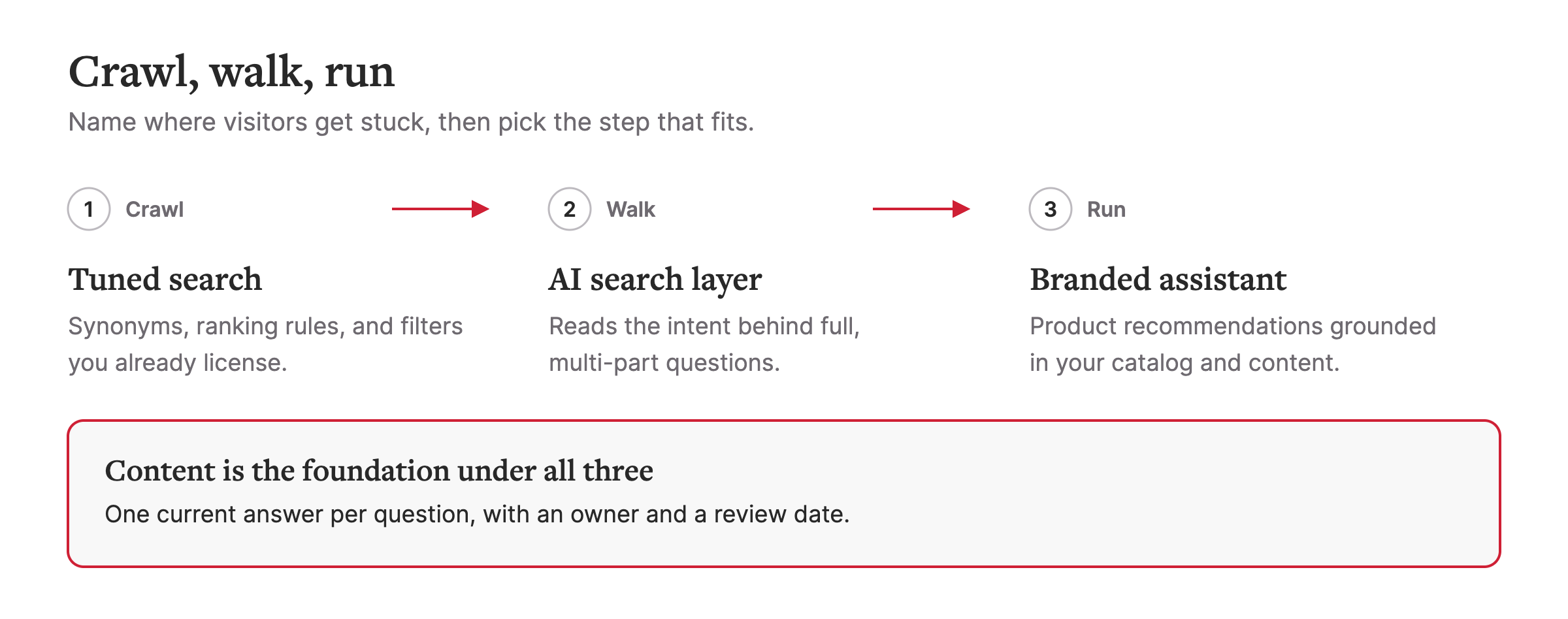
Where are visitors getting stuck today? Name that problem first, then pick the tool. In our webinar we framed this as crawl, walk, run, with tuned search at crawl, AI search at walk, and a branded assistant at run. Content is the foundation under all three.
| Starting point | Effort | Best when | Watch out for |
|---|---|---|---|
| Conversational search | Low to tune what you have. Medium to add an AI search layer. | Lots of visitors search, and your logs show empty results, irrelevant results, or long multi-part questions. | Paying for an AI layer before tuning the synonyms, ranking, and filters you already license. |
| Site assistant | Medium to high, plus ongoing testing. | Your team answers the same questions every day, or visitors need help after hours or with a complex choice. | Wrong answers from conflicting pages, no human handoff, or a bot that repeats what search already does. |
| Question-ready content | Low to start, then ongoing ownership. | Answers are buried in PDFs, spread across several pages, or out of date. | Treating it as a one-time cleanup. Without an owner and a review date, pages drift. |
If you can't tell which row fits, start with the content. It's the cheapest way to start, and every later step depends on it.
What to measure
Set a baseline before you change anything, and report in GA4 or your own analytics platform as well as the vendor dashboard.
- Search. Share of searches with no results, exits from the results page, and conversion rate for sessions that use search.
- Assistant. Resolution rate, handoff rate, repeat questions after an answer, and conversions from assisted sessions.
- Content. Whether each top question has one current answer, and how those pages perform in organic search and AI referrals.
Start with your top ten questions
Pull your top site searches and the questions your team answers most. Can your site answer each one in a single step? That list tells you whether to start with search, an assistant, or content.
For the full crawl, walk, run walkthrough, watch the on-demand webinar Conversational AI: Evolving from Basic Search & Chat with Aaron Baecker, Jay Ménard, and Jon Beaulieu.
Part 3 of this series, "How to optimize your data for AI," comes out later in November and covers the foundation under all three moves, from content inventory to structured data to keeping answers current.
If you’d like a hand figuring out where to start, our team is here to help. We offer a working session to map where your search and chat experience stands today, and what’s possible from here. We’d love to continue the conversation.
Stay informed, sign up for our newsletter.