
How to Optimize Content for AI Search
TL;DR
Optimizing content for AI search means making your content and product data easy for a machine to find, read, and answer from. That covers your own site search and chatbot as well as ChatGPT, Perplexity, and Google. In our work it comes down to 16 fixes, and 12 of them help in both places. Start by writing down the questions customers ask most, then test every fix against them.
In July 2026, Adobe measured how much of a typical U.S. retail product page AI can understand and cite. Stores that sell sporting goods scored highest at 70%. General merchandise retailers scored a meager 48% (Adobe AI Traffic Trends Report, Aug. 19, 2026).
Nothing is missing for shoppers. The rest of the page is still there, but AI can't read it. ChatGPT, Perplexity, and Google AI Mode can't cite it, and your own site search and chatbot can't answer from it. So optimizing content for AI search engines happens underneath both, in your content and product data. (For customer data, see our post on Adobe's 2026 trends report and the data gap.)
This is part 3 of our conversational AI series, after Part 1 on personal AI agents and Part 2 on conversational search and chat.
Is optimizing content for AI search different from SEO?
For Google, mostly no. Google's guide to generative AI search says optimizing for it "is optimizing for the search experience, and thus still SEO" (Google Search Central, updated July 10, 2026). The same guide says structured data isn't required, and you don't need to break content into tiny pieces. A product description that reads well as one paragraph is fine as it is. Google's AI features page adds that AI Overviews and AI Mode need no special optimizations (updated Dec. 10, 2025).
Your own AI is where the story differs. Site search, an on-site assistant, or a concierge like Adobe Brand Concierge reads your pages through its own index and answers from whatever it finds there. Say a shopper asks whether your winter jacket is waterproof. If that detail only lives in a spec sheet PDF the assistant never indexed, it can tell them it doesn't know, or even worse, just guess.
So the target is AI-ready content, meaning content and product data that a machine can find, read, and answer from without a person interpreting it.
12 of the 16 fixes also help you show up in AI answers
In our October 21 webinar, Conversational AI: Evolving from Basic Search & Chat, we showed the 16 fixes we work from when a client asks us to get their data ready for AI. We count 12 that improve both your own search and chat and how ChatGPT, Perplexity, and Google read you. The other four only matter on your own site.
Ownership splits too. Eleven fixes sit with your web and content team, three depend on your search or chat platform, and two live with product and data teams in a product information management (PIM) system, an ERP, or a CRM.
| Fix | What it does | Also helps outside AI | Who owns it |
|---|---|---|---|
| Content and data inventory | Lists what exists, where it lives, and what format it's in | Yes | Web and content team |
| Duplicate and conflict resolution | Leaves one current answer per question | Yes | Web and content team |
| PDF and document extraction | Moves key facts out of PDFs and onto pages | Yes | Web and content team |
| Render and crawlability fixes | Makes sure machines get the same content people do | Yes | Web and content team |
| Content restructuring | Gives pages real headings and a short answer up front | Yes | Web and content team |
| Taxonomy and tag cleanup | Keeps filters, facets, and retrieval accurate | Yes | Web and content team |
| Metadata schema and backfill | Makes every page carry its own context | Yes | Web and content team |
| Structured data and schema markup | Labels page content in a format machines read | Yes | Web and content team |
| Index scope rules | Keeps drafts, thin pages, and old archives out of results | Yes | Web and content team |
| Freshness pipeline | Re-indexes pages when you publish | Yes | Web and content team |
| Golden question set | Real questions with agreed answers to test every fix | Yes | Web and content team |
| Chunking and embedding setup | Splits pages into passages your own search can match | No | Search or chat platform |
| Entitlement mapping | Controls who sees gated content and member pricing | No | Search or chat platform |
| Search and conversation analytics | Shows what people ask and where answers fail | No | Search or chat platform |
| Product attribute completeness | Fills in the attributes people filter and ask on | Yes | Product and data teams (PIM or ERP) |
| Non-website sources | Connects order, inventory, or CRM data | No | Product and data teams (commerce or CRM) |
What your web and content team can fix
Start with an inventory of what exists, where it lives, and what format it's in. Then find the duplicates and conflicts. Old pages rarely get turned off, so last year's holiday shipping cutoff page is often still live next to this year's. An assistant reading both pages has no reliable way to pick the current one. Each question needs one current answer, with older pages retired or redirected.
“So many people use their website as a de facto archive... AI doesn't know what that correct answer is.”
— Jay Ménard, Director of User Experience and Digital Strategy, Northern
PDF extraction usually comes next. Spec sheets and price lists often live in PDFs, which Microsoft's Bing team notes often lack the structured signals, like headings and metadata, that HTML provides (Microsoft Advertising, Oct. 8, 2025). You don't need to convert every PDF. Pull out the facts that answer real questions, like a price or a spec, and publish them on the page. Keep the PDF as a download.
Render and crawlability fixes make sure machines get the same content people do. Googlebot renders JavaScript, but Google's own guidance notes that "not all bots can run JavaScript" (Google Search Central, Mar. 4, 2026). OpenAI, Anthropic, and Perplexity don't document whether theirs do, and the largest public test, by Vercel and MERJ in late 2024, found none of their crawlers ran JavaScript (Vercel, Dec. 17, 2024). If reviews or stock only load after a script runs, assume many AI crawlers never see them. Our webinar Invisible to AI: Evolving from SEO to GEO goes deeper.
Content restructuring sounds bigger than it is. Pages need real headings, the short answer near the top, and a few questions and answers where people tend to get stuck. Part 2 covers how to write that way. You don't have to rework every page by hand, either. Change the product page template once, and every page built on it follows.
Taxonomy and tag cleanup, plus metadata schema and backfill, is the unglamorous part of the list. It's how each page tells a machine what it is, who it's for, and when someone last checked it. AI tools can lift a single line out of a page (Microsoft Advertising, Oct. 8, 2025), so that line has to carry its context with it. Your own filters and facets run on the same tags. When one page is tagged "shoes" and the next one "footwear," one of them goes missing from the filter.
Structured data and schema markup label what's on a page, like a product's price, so machines don't have to guess. Microsoft's Bing team says schema "helps search engines and AI systems understand your content" (Microsoft Advertising, Oct. 8, 2025). Google's guidance is that the markup has to match what people can see on the page. If you added FAQ markup for extra space in Google results, that ended May 7, 2026, when Google stopped showing FAQ rich results (Google Search Central). Question-and-answer pairs still help readers and machines find answers.
What depends on your search or chat platform
Three fixes only matter for your own tools. Chunking and embedding setup decides how your search or assistant splits pages into passages. Entitlement mapping decides who sees gated content or member pricing. Search and conversation analytics show what people ask and where answers fail. On most platforms these are configuration, and on a custom build they're real engineering. None of them change what ChatGPT or Google sees.
How to optimize product content for AI search
Product attribute completeness is the one fix most web teams can't do alone. If your PIM or ERP doesn't have a width, material, or compatibility field for a product, nobody can filter on it and no assistant can recommend from it. A shopper asking for wide trail runners under $150 gets nothing back, even if you stock three pairs.
Outside AI reads the same product data through feeds, and the feeds don't all ask for the same things. In May 2026, Google Merchant Center added six optional conversational attributes, including question and answer, to help AI surfaces like AI Mode (Google Merchant Center Help). OpenAI's ChatGPT feed has its own required fields and leaves question-and-answer lists out (OpenAI). Keep one complete catalog in your PIM and map it to each feed, or someone ends up fixing the same missing attribute in every feed, one at a time.
The last fix, non-website sources, only matters on your own site. "Where's my order?" needs commerce or CRM data that no web page holds, and it belongs to the team that runs those systems.
Site search, chat, and AI crawlers each keep their own copy of your content
Fixing a page only helps once every system that reads it has picked up the change. Your search platform indexes the site, your chat tool keeps its own knowledge base, and outside AI crawlers keep their own copies. None of them tells the others when something changes.
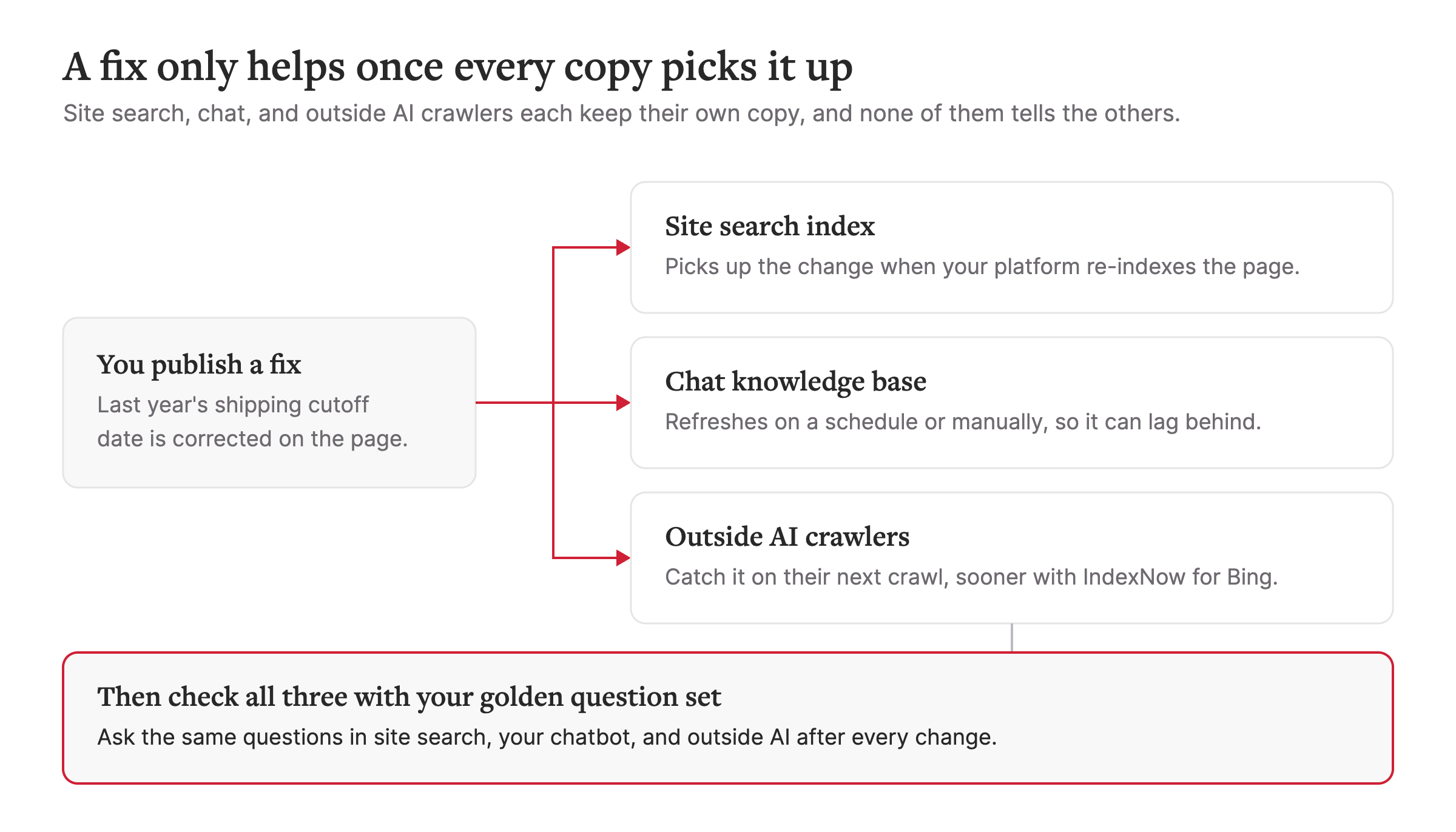
Index scope rules decide what each copy is allowed to hold. Drafts, thin pages, test pages, and last year's shipping page don't belong in your search index or your assistant's knowledge base. Which bots get in at all is covered in Part 1.
A freshness pipeline re-indexes content when you publish, so a corrected answer reaches every copy. Adobe Brand Concierge can refresh its knowledge base on a schedule or manually (Adobe Experience League, Oct. 27, 2026). Bing wants your sitemap's last-modified dates to be accurate and recommends IndexNow, which pings search engines when a page changes (Bing Webmaster Blog, July 31, 2025). IndexNow lists Bing and four other engines. Google isn't one of them.
Back to that holiday shipping page. Say you fix the cutoff date on Monday, but your chatbot's knowledge base only refreshes on Sunday nights. For six days, anyone who asks the chatbot gets last year's date.
Test every fix against a golden question set
A golden question set is a fixed list of real customer questions, each with one agreed answer, an owner, and the page the answer comes from. It's how you tell whether a fix worked.
Pull the questions from your site search logs and support inbox (Part 2 covers where to look). Start small. Ten to 20 questions is plenty. Get each answer signed off by the person who owns it, like the shipping lead for delivery questions. Otherwise you're grading against an answer nobody agreed to.
That's where Langara College started. When we looked at its support requests, 10 questions covered 80% of the tasks its team handled. So we worked with Langara to agree on clear answers to those 10 first. AI handles everything else, with a path to a person when it can't help.
Then run the set. Ask every question in your site search, your chatbot, ChatGPT, Perplexity, and Google AI Mode, and mark each answer right or wrong. Run it again after every content change. "Is our data ready for AI?" stops being a gut feeling and becomes a number you can track.
Illustrative example of a golden question set scorecard
| Question | Agreed answer | Source page | Site search | Chatbot | Outside AI |
|---|---|---|---|---|---|
| What's the last day to order for delivery by December 24? | December 17 with standard shipping | Holiday shipping page | Pass | Fail, gave last year's date | Fail, cited the old page |
| Does the trail runner come in wide widths? | Yes, men's 8 to 13 | Product page | Fail, no width filter | Pass | Pass |
| Can I pick up an online order in store the same day? | Yes, for in-stock items ordered before 2 p.m. | Store pickup page | Pass | Pass | Fail, answer was in a PDF |
What to fix first
If you're not sure where to begin, we'd start in this order.
- Run our free AI Readability Check on your most important pages to see what AI can and can't read today.
- Write your golden question set.
- Find every page that answers those questions, and retire or redirect the ones that conflict.
- Turn the PDFs behind those answers into pages.
- Then work through metadata, taxonomy, and schema, and set up re-indexing on publish.
Each step shows up in your golden question set results. For tools that track AI visibility, see our post on LLM optimization and AI visibility tools.
Frequently asked questions
Do I need schema markup for AI search?
Not for Google. Google says structured data isn't required for generative AI search and there's no special schema.org markup to add (July 10, 2026). Schema still helps machines read your pages, and any markup should match the visible text. FAQ rich results stopped appearing in Google Search on May 7, 2026.
Is AI-ready content the same as AI-ready data?
No. AI-ready data usually means the customer, analytics, and operational data that AI models and tools run on. AI-ready content means website content and product data that search engines, AI assistants, and your own site search can read and answer from. This post covers the second. Our post on Adobe's 2026 trends report and the data gap covers the first.
How do I prepare product data for AI shopping?
Complete your product attributes in your PIM or ERP first, then map them to each feed you send. Google Merchant Center and OpenAI's product feed for ChatGPT have different required fields, so one complete catalog upstream is easier to maintain than fixing each feed separately.
Do I need to replace my CMS to optimize content for AI search?
No. The work happens in your content, templates, and data. It runs on the platforms most teams already use, including Drupal, WordPress, AEM, Adobe Commerce, and Shopify.
Not sure which of the 16 fixes to start with? The team behind our conversational AI webinar can help. We offer a working session to map where your search, chat, and content stand today and which fixes to tackle first. We'd love to continue the conversation.
Stay informed, sign up for our newsletter.